yMarkdownReader
I had too many Markdown files from vibecoding and not enough patience for readers that treated navigation like an optional luxury.
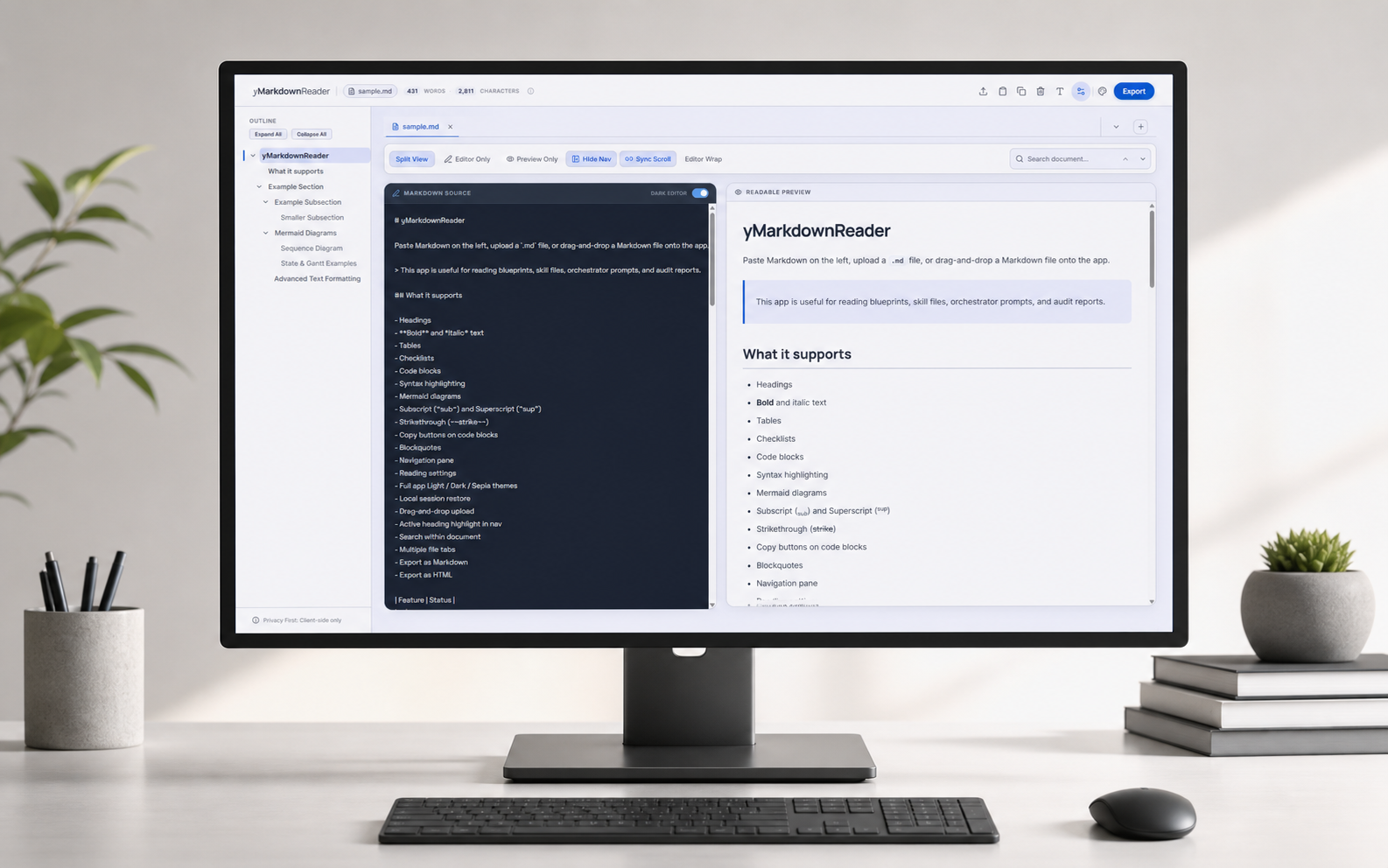
A privacy-conscious browser Markdown reader: paste, upload, or drag in files, keep them in local browser storage, navigate long documents by heading, and read technical notes without sending the content to a backend.
THESPARK
This started with the very glamorous problem of having too many Markdown files.
Vibecoding produces a lot of artifacts. Plans, handovers, audits, prompts, bug notes, little architectural confessions written at 1:00 AM. They are useful, but only if you can actually read them while working. Opening raw Markdown in an editor is fine until the file becomes long enough to need a map, at which point you are basically spelunking with line numbers.
I wanted something simple: paste or open a Markdown file, get a clean reading view, keep the outline visible, jump between headings, search the document, and come back later without having to reload the same notes like a ritual.
That sounded like a solved problem. It was not, at least not in the oddly specific way I wanted. Some readers looked nice but had weak navigation. Some had navigation but felt like a CMS with commitment issues. Some wanted accounts, servers, sync, or a suspicious amount of ceremony for a file that was already sitting on my machine.
The privacy bit mattered too. A lot of these Markdown files are work-in-progress notes. They are not secrets in the spy-movie sense, but they are also not something I want to upload somewhere just to make headings clickable. The right version was local-first: document content stays in the browser, persistence uses local storage, and the app does not need a backend to do its job.
So the question became: could I build a Markdown reader that felt like a proper reading workspace, but kept the boring, reassuring constraint of "your document does not leave your browser"?
THELAB
The current version is a browser-based Markdown workspace pretending to be a simple reader.
You can paste Markdown directly, upload .md, .markdown, or .txt files, or drag a file into the app. Each file opens as a tab, and the session can restore from browser storage the next time you visit. That sounds small, but it changes the app from "temporary preview box" into "place where I can keep the notes I am actively using."
The main reading loop is built around the outline. Headings become a navigation pane, the active section follows your scroll position, and long vibecoding documents stop feeling like a wall of text. Search sits beside that: type a phrase, jump between matches, clear it when done, and get back to reading instead of negotiating with browser find.
The app also has the things that become mandatory the moment you use it for real technical notes:
- Split view for source and preview
- Synced scrolling between editor and rendered document
- Light, dark, and sepia reading themes
- Adjustable font size, line height, and preview width
- Syntax-highlighted code blocks with copy buttons
- Mermaid diagram rendering for architecture sketches and workflow charts
- Subscript, superscript, tables, task lists, and the usual GitHub-flavored Markdown bits
- Export to Markdown or standalone HTML
The stack is intentionally plain: React, Vite, react-markdown, a handful of Markdown plugins, Mermaid, local storage, and CSS. No database. No login wall. No server that needs to know what you are reading.
The important product decision is that persistence is local. If you reload the page, your working set can come back. If you close the tab, the documents can still be there next time. But the content is still browser-side, which is the whole point. It is a desk, not a Dropbox.
THEMESS
The first trap was that "render Markdown" is not the same thing as "make Markdown comfortable to use."
Rendering the basics was easy enough. Then real files showed up. Long files need an outline. Outlines need stable heading IDs. Stable heading IDs need to ignore headings inside code fences, because a code sample with # hello should not become a navigation item. Search needs highlights. Highlights need to know which rendered span is actually visible. Hidden export containers should not steal search indices from the document you are looking at. This is how a reader becomes a small indexing engine while pretending to be calm.
Mermaid diagrams created their own little weather system. Diagrams needed to render lazily so the app did not feel heavy, inherit the current theme, remain readable across light, dark, and sepia modes, and export as portable SVGs. Gantt charts in particular behaved like they had never agreed to live inside a responsive layout. The eventual fix involved explicit sizing, scroll containers, and enough theme-variable mapping to make a color palette question its life choices.
Mobile was the other reality check. Desktop layouts forgive a lot. Phones do not. The navigation pane had to become a drawer. The tab bar had to scroll without tiny buttons intercepting touch events. Sticky controls needed to remain reachable without covering the document. Browser chrome changes meant 100vh was not quite honest, so the shell moved to dynamic viewport sizing. The app had to fit small screens without turning every button into a thumb exercise.
Then came the small sharp edges: export sanitization, clear-content confirmation, modal focus handling, Escape key behavior, accessible labels for icon-only controls, dropdown semantics, tooltip stacking, and the surprisingly personal pain of a tooltip hiding behind a tab bar.
That was the real project. Not "can Markdown render?" but "can this feel trustworthy when I am using it in the middle of work and have no patience left?"
THEREVEAL
What exists now is a local-first Markdown reading workspace.
You can open the live site, drop in a working document, and immediately get a cleaner reading surface with outline navigation, search, tabs, themes, diagrams, and export. The app remembers your working set in local browser storage, so it behaves more like a tool on your desk than a disposable preview page.
For my own use, the killer feature is still navigation. Vibecoding notes tend to be long, nested, and full of sections that made sense when they were generated but become annoying five minutes later. A persistent outline turns those files back into something you can move through. It makes "read the handover" less like eating drywall.
The privacy model is deliberately boring. There is no backend holding the documents. The reader does not need an account to be useful. The content lives in the browser, and the app is mainly a better surface for material the user already has.
The project also ended up becoming a useful lesson in how much product quality hides below the headline feature. A Markdown reader sounds small until you care about headings, diagrams, export, mobile ergonomics, local persistence, accessibility, and all the tiny edge cases that make a tool feel either dependable or slightly cursed.
It is not trying to be Notion, Obsidian, or a publishing platform. It is a calmer thing: a browser reader for Markdown files that are already part of the work, with enough structure to make them usable and enough restraint to leave the user's content where it belongs.